This document explains the jobs command, which is part of Job control in UNIX and UNIX LIKE systems.
The jobs command is used to check the jobs that are currently running in the background of the current shell.
In comparison to Windows,
jobs is similar to checking the programs that are running in the background, minimized and not visible in the foreground, akin to the taskbar.
🔵 NOTE
In UNIX, a
Jobrefers to a collection ofProcesses. The PID of a job refers to theProcess Group ID.
🔵 NOTE
This was tested using
zshon MacOS, Sonoma.
zshhas extended features, and more information can be found inman zshbuiltins.
🔵 NOTE
This document is a translation of the
jobsdescription fromThe Open Group Base Specifications Issue 7, provided by the official UNIX group,THE Open GROUP, and briefly explains the parts that users need to know.
SYNOPSIS
[ ](brackets) are optional.|(pipe) indicates that one of several options can be chosen....(three dots) indicates that multiple arguments can be specified.
jobs [-l| -p][job_id...]OPTIONS
-
-l
(lowercase L) provides more information about each listed job. This information includes the job number, current job, process group ID, state, and the command that formed the job. -
-p
displays only the process ID of the process group leader for the selected job.
OPERANDS
job_id
specifies the job for which to display the status. If nojob_idis specified, status information for all jobs will be displayed. The format ofjob_idis described in XBDJob Control Job ID.
STDOUT
If the -p option is specified,
the output consists of one line for each process ID.
"%d\n", <process ID>If the -l option is not specified,
the output consists of a series of lines in the following format.
"[%d] %c %s %s\n", <job-number>, <current>, <state>, <command>Where the fields are as follows:
-
<job-number>- A number that can be used to identify the process group for the
wait,fg,bg, andkillutilities. - These utilities can identify a job by prefixing the job number with
%.
- A number that can be used to identify the process group for the
-
<current>- The character
+identifies the job that will be used as the default for thefgorbgutilities.
This job can also be specified usingjob_id %+or"%%". - The character
-identifies the job that will become the default when the current default job terminates.
This job can also be specified usingjob_id %-. - For other jobs, this field is a
space. - At most one job can be identified with
+, and at most one job can be identified with-. - If any job is suspended, the current job must be a suspended job.
- If at least two jobs are suspended, the previous job must also be a suspended job.
- The character
-
<state>
One of the following strings (inPOSIX locale):Running
Indicates that the job has not been stopped by a signal and has not terminated.Done
Indicates that the job has completed and returned an exit status of0.Done(code)
Indicates that the job has completed normally and terminated with the specified non-zero exit status,code.Stopped
Indicates that the job has been stopped by theSIGTSTPsignal.Stopped (SIGTSTP)
Indicates that the job has been stopped by theSIGTSTPsignal.Stopped (SIGSTOP)
Indicates that the job has been stopped by theSIGSTOPsignal.Stopped (SIGTTIN)
Indicates that the job has been stopped by theSIGTTINsignal.Stopped (SIGTTOU)
Indicates that the job has been stopped by theSIGTTOUsignal.
-
<command>- The relevant command provided to the shell.
If the -l option is specified,
a field containing the process group ID is inserted before the <state> field.
Additionally, more processes within the process group may be output on separate lines, using only the process ID and <command> fields.
EXAMPLE
First, enter a command in the shell to create a simple job.
sleep 100 &This command runs sleep, which waits for 10 minutes and then terminates, in the background using & (ampersand).
🔵 NOTE
&(ampersand) is the command to run a process in the background in the current session.
The result of running the jobs command with no options is as follows.
Command input
jobsOutput
[1] + 12345 Running sleep $((60 * 10)) &The result of running the jobs command using zsh is as follows.
In zsh, when a job terminates, Done is displayed.
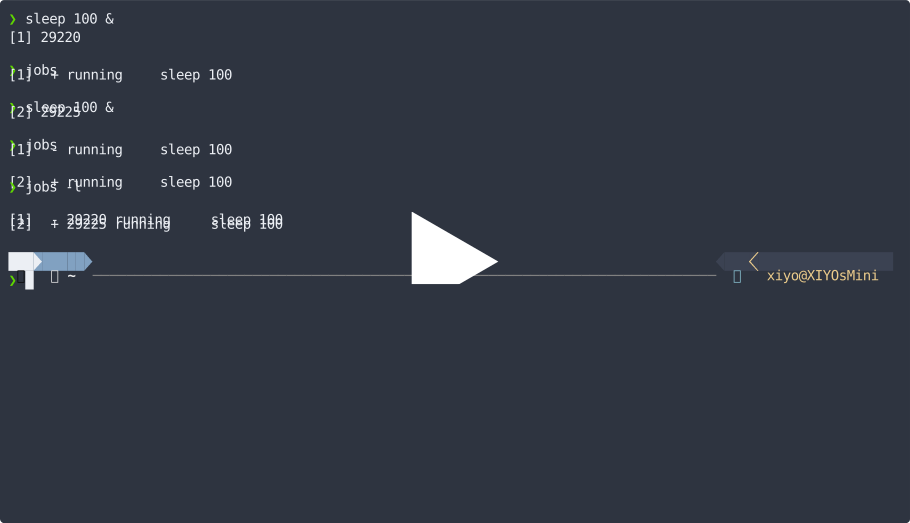
🟣 IMPORTANT
zsh 5.9 (x86_64-apple-darwin23.0) has a bug where using jobs -p should output only the process numbers, but it behaves the same as the -l option.
In contrast, bash correctly outputs only the process numbers with jobs -p.